Unifrog

At Chiltern Hills Academy, we’re committed to helping every student Create, Aspire and Excel—living life in all its fullness. That’s why we’ve partnered with Unifrog, an award-winning online careers platform.

All students from Year 7 to Year 13 receive their own Unifrog account—a powerful tool to explore your interests, compare opportunities, and plan your journey beyond school.


What Can You Do with Unifrog?

Explore Your Pathways
Discover your strengths, explore careers, and connect with universities, employers and industry experts.

Compare Your Options
Research university courses, apprenticeships and further education opportunities in the UK and beyond.

Get Application Support
Access tools and guidance for CVs, personal statements, jobs and apprenticeship applications.

Track Your Achievements
Record work experience, enrichment activities and careers events in one place.

Parents & Carers: You’re Welcome Too!

We encourage parents and guardians to sign up for Unifrog too. Simply use the code CHHIparents to access the platform and support your child’s career journey.

Please use the link below to access the website.

“I really enjoyed using Unifrog—it made the daunting university application process feel fun and informative.”

— Grace A

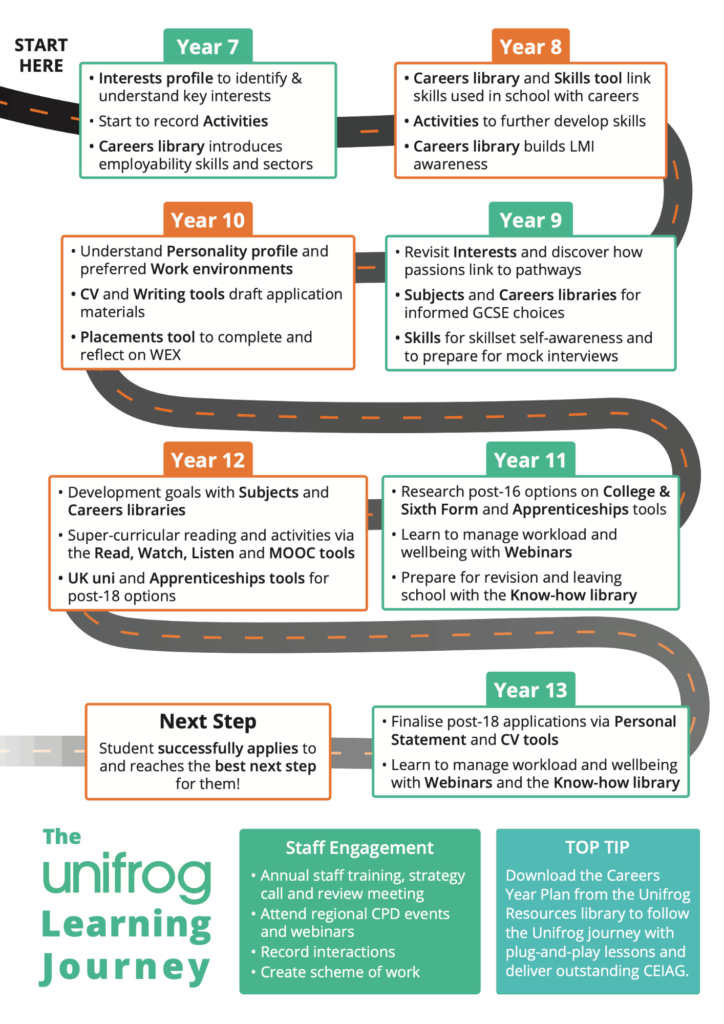
At Chiltern Hills Academy, Unifrog supports students at every stage of their school journey. Here’s how each year group uses it to explore interests, build skills, and make confident future choices:

Year 7 – The Journey Starts
  • Complete an interests profile to explore what excites you
  • Begin to record activities and achievements
  • Use the Careers Library to discover employability skills and different career sectors
Year 8
  • Explore the Skills Tool to connect schoolwork with career paths
  • Participate in enriching activities to develop transferable skills
  • Use the Careers Library to learn about job markets and career options through Labour Market Information (LMI)


Year 9
  • Revisit your interests and start understanding how they link to your GCSE choices
  • Use Subjects and Career Libraries to make informed decisions
  • Practice self-awareness and interview skills through mock scenarios
Year 10
  • Dive into your Personality Profile to understand your preferred working styles
  • Use CV and writing tools to draft career-related documents
  • Reflect on work experience using the Placements Tool
Year 11
  • Begin researching Post-16 options: Sixth Form, college, or apprenticeships
  • Learn to manage workload and wellbeing with webinars
  • Access revision help and the Know-how Library to prepare for exams
Year 12
  • Set development goals in subjects and explore careers through the Career Libraries
  • Engage in super-curricular learning, including reading, MOOCs, and videos
  • Research UK universities and apprenticeships for post-18 planning
Year 13 – The Journey Continues
  • Finalise applications using Personal Statement and CV tools
  • Balance wellbeing and workload through wellbeing webinars and the Know-how Library
  • Apply confidently and take your next step with clarity
View & Download the Unifrog Journey Infographic
Download Infographic

“Unifrog helped me find degree apprenticeships based on subject and location. It’s easy to use and suits everyone.”

— Tayyab K

This journey ensures that every student is supported, informed, and inspired to make meaningful choices in line with their values.

Watch this short video for a summary of the Learning Journey
Come and see what makes Chiltern Hills Academy such a special place to learn

Book a Visit